

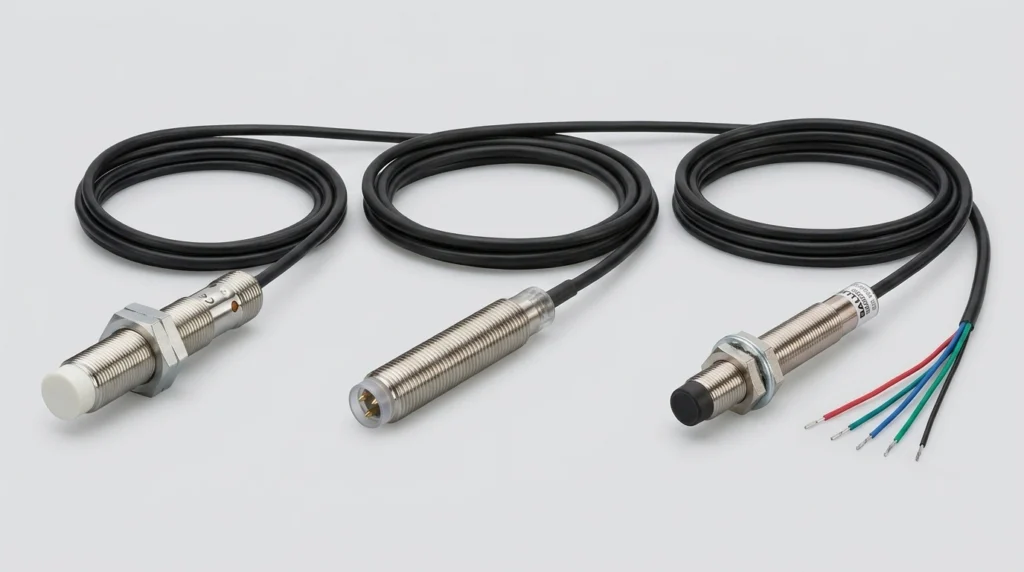
IFM Electronic Sensors: Product Guide for IFM204, BES013N, BES02F0 and IFM Sensor Cables
Master your setup with IFM sensors and cables. Decode the IFM204, clarify Balluff cross-references, check wiring steps, and configure IO-Link masters.
Choosing the right industrial HMI comes down to four factors: compatibility with your controller’s communication protocol, the environmental rating of the panel, the touchscreen technology suited to your operators, and the software ecosystem your team can maintain long-term. Get those right, and display size, brand preference, and feature lists fall into place naturally.
An industrial HMI – Human-Machine Interface – is the operator-facing layer of an automation system. It’s typically a touchscreen panel that lets production staff monitor processes, adjust setpoints, acknowledge alarms, and interact with PLCs or other controllers in real time. According to Fortune Business Insights, the global HMI market is projected to reach USD 10.83 billion by 2032, growing at a CAGR of 8.5%. That growth reflects just how deeply these panels have become embedded in manufacturing, energy, and process industries worldwide.
The wrong panel choice isn’t always obvious at commissioning. It shows up six months later – a screen that won’t respond with gloved hands, a unit that overheats near a furnace, or a protocol mismatch that requires a workaround nobody documented. The guide below cuts through the noise with practical, specific answers.
There’s more variation in industrial HMI hardware than most spec sheets suggest. Understanding the differences between touchscreen types, form factors, and thermal designs helps narrow down the right unit before comparing brands.
The choice between resistive and capacitive touch has direct consequences in production environments – and it’s one of the most commonly overlooked decisions.
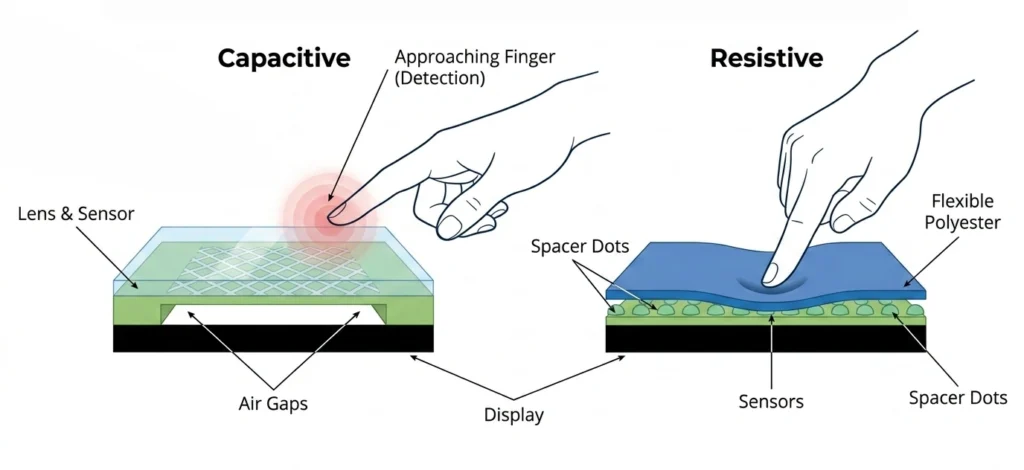
Resistive touchscreens respond to physical pressure. They work with gloved hands, styluses, or any pointed object, making them the right call in environments where operators wear PPE. The tradeoffs are lower optical clarity and a shorter lifespan under constant heavy use.
Capacitive touchscreens – the same technology in smartphones – deliver sharper image quality and faster response. The catch: they require bare skin or specially conductive gloves.
Pro Tip: In food processing, pharmaceutical, or chemical plants where gloves are mandatory, capacitive panels create daily friction for operators. Resistive technology is the practical choice there, even if it looks less impressive on a spec sheet.
Capacitive is increasingly common in newer industrial automation HMI models, particularly in light assembly, logistics, and OEM machine building. Resistive remains the default in harsh, high-PPE, or high-moisture environments.
Widescreen panels (16:9 or 16:10) have become the standard for displays above 10 inches. They’re well-suited to dashboard-style visualizations – trend charts, multi-column data displays, and side-by-side process views work naturally in that format.
The older 4:3 aspect ratio still appears in compact or panel-mount applications where cabinet space is limited. Vertical content like alarm lists or parameter tables often fits better in a squarer frame. The format choice should follow the screen layout, not personal preference.
A fan is a maintenance liability that most engineers underestimate at purchase. In high-particulate environments – cement plants, foundries, woodworking facilities – fan-cooled units draw in dust and debris that gradually clogs internals and shortens service life.
Fanless industrial HMIs use passive thermal management, typically through aluminum heatsink housings. They run silently, require less preventive maintenance, and hold up better over long deployment cycles.
Most standard industrial panels are rated for 0°C to 50°C operating temperature. Applications near heat sources, in outdoor enclosures, or in cold storage may need extended-range models. Always verify the operating temperature spec before installation – the word “rugged” on a product page is not a specification.
A dedicated HMI is a purpose-built device – fixed software, locked hardware, commissioned through one specific development environment. It’s predictable, supportable, and well-suited to single-machine or well-defined multi-machine applications.
A panel PC runs a general-purpose operating system – typically Windows 10 IoT Enterprise LTSC in current models – and can host third-party SCADA software, OPC servers, or custom visualization applications alongside the HMI runtime.
⚠ Note on Windows CE: Many legacy industrial HMIs still run Windows CE, including older Allen-Bradley and Siemens units. Microsoft ended mainstream support for Windows CE 6.0 in 2011, and CE 7.0 reached end of life in 2018. CE-based panels receive no OS-level security patches. Windows 10 IoT Enterprise LTSC carries a 10-year support lifecycle – a meaningful improvement for any deployment expected to run past 2030. Factor this into lifecycle planning, especially for plants with active cybersecurity requirements.
This is where the decision gets genuinely complex, particularly for engineers speccing panels for mixed-brand facilities. Every major automation brand runs a preferred protocol, and assuming cross-brand compatibility without verification is a common – and costly – mistake.
Here’s a clear breakdown of the native communication standards for each major brand:
A facility running Siemens PLCs on the process side and Allen-Bradley on the packaging line needs an industrial HMI that can handle both – or a middleware solution like an OPC UA server.
Pro-face panels are frequently the answer in heterogeneous environments. GP-Pro EX includes drivers for hundreds of controller families, which is why the GP4000 series appears regularly in facilities that have accumulated equipment from multiple vendors over time.
Panel PCs running OPC UA also handle multi-protocol environments well, though they require more configuration and ongoing IT management than a dedicated HMI.
Key rule: never assume a panel from Brand A will natively communicate with a controller from Brand B. The protocol compatibility section of any panel’s datasheet will define what’s natively supported. Read it before committing to a purchase.
A thin client industrial HMI has no local application runtime. It connects to a centralized SCADA or HMI server and renders the operator interface remotely. The advantages are clear in large installations:
The tradeoff is network dependency. If the server or the network segment goes down, the panel loses visibility entirely. Thin client architecture is best suited to plants with reliable, redundant network infrastructure and a centralized IT/OT team to manage the server.
These three ratings appear on nearly every industrial panel datasheet, but they’re not interchangeable and shouldn’t be treated as a sliding scale of “more rugged.”
| Rating | Dust Protection | Water Protection | Best For |
| IP65 | Fully dust-tight | Low-pressure water jets from any direction | Standard panel-mount industrial cabinets |
| IP66 | Fully dust-tight | High-pressure water jets | Washdown environments: food & beverage, meat processing |
| NEMA 4X | Dust and debris | Hose-directed water, plus corrosion resistance | Chemical plants, coastal facilities, outdoor enclosures |
Important: Most industrial HMI panels achieve IP65 or IP66 ratings on the front face only. The rear of the unit typically carries a lower rating. In harsh environments, the panel still needs to be mounted in a properly sealed enclosure unless the datasheet explicitly states full-unit protection.
Each major brand approaches HMI design with a different philosophy – and a different assumption about the ecosystem the panel will operate in.
The Allen Bradley HMI lineup centers on the PanelView Plus 7 series, available in Standard and Performance variants. The Standard series connects to ControlLogix 5570 and CompactLogix 5370 controllers over EtherNet/IP, supports up to 100 screens and 500 alarms per application, and runs FactoryTalk View Machine Edition (ME) on Windows CE.
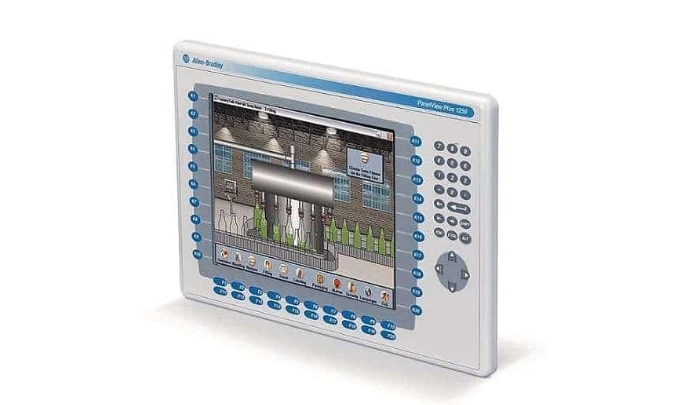
Performance models extend that with larger screen options up to 15 inches, increased processing power, and dual Ethernet ports for DLR ring topology – relevant in applications that need single-fault network resilience.
For plant-level or multi-machine visualization, FactoryTalk View Site Edition (SE) runs on a separate server and connects to panel PCs or thin clients across the facility.
The Siemens HMI family spans from compact KTP Basic panels to TP Comfort and MP Multi Panel lines. KTP units are entry-level – smaller screens, PROFINET-connected, fixed function – while Comfort panels add higher resolution, greater tag capacity, and support for recipe management and data logging.
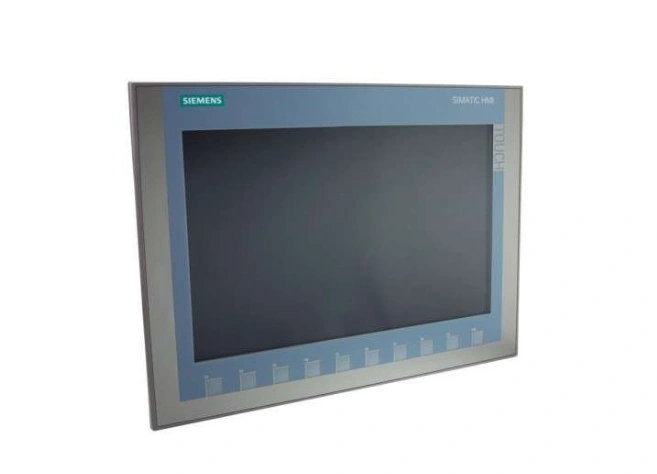
All Siemens SIMATIC HMI panels are configured through TIA Portal with WinCC runtime. Controller and HMI programming share the same project environment and tag database, which reduces configuration errors and cuts commissioning time. For plants running S7-1200 or S7-1500 PLCs, this ecosystem is the natural path – the integration advantage is real.
The Mitsubishi HMI GOT2000 series replaced the GOT1000 as the current flagship range. It supports Ethernet connectivity to MELSEC controllers and handles third-party PLC communication through optional communication units. Screen sizes run from 4 to 21 inches. All configurations are handled through GT Designer3.
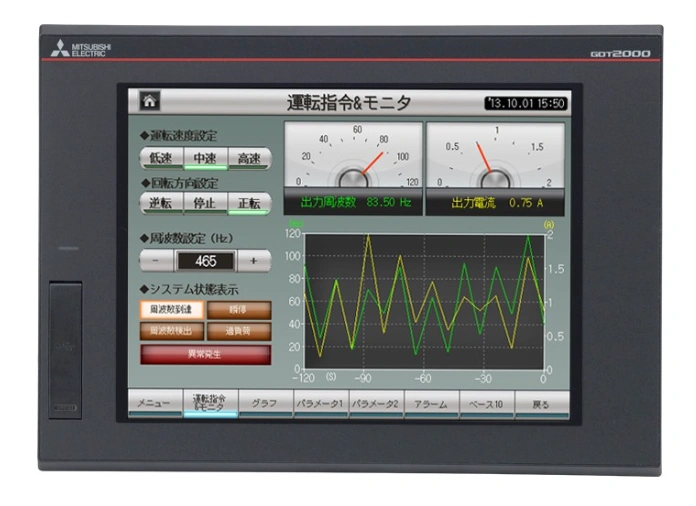
GOT2000 panels are consistently rated for reliable long-term performance in Mitsubishi automation environments. Mitsubishi Electric committed $150 million to HMI research and development in 2024, focusing on smart factory integration and machine-learning-assisted interfaces – the GOT series is positioned to absorb those developments over the coming product cycles.
The Omron HMI NA5 is the premium option – a capacitive touchscreen panel designed for deep integration with Omron NJ/NX controllers via EtherNet/IP. It’s configured through Sysmac Studio, the same environment used for NJ/NX PLC programming, which means a unified development workflow for Omron-native installations.
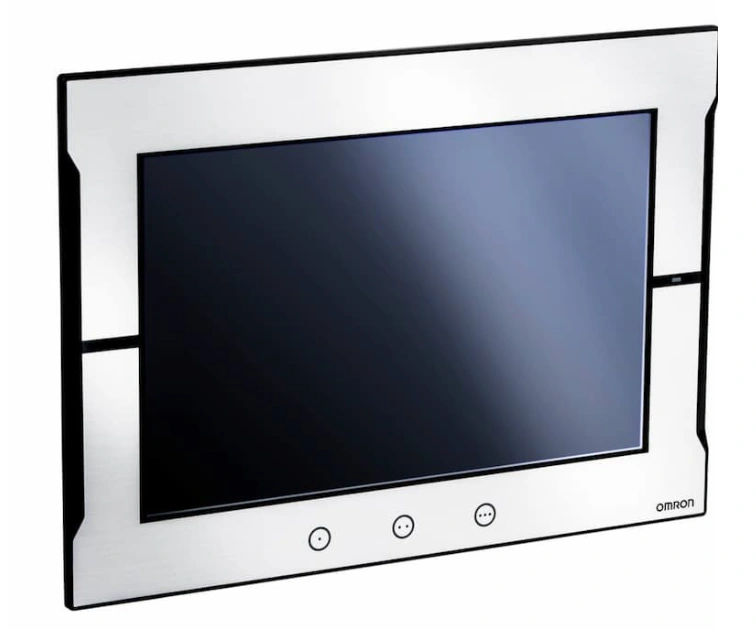
The NB series handles more basic applications, with resistive touch and smaller screen sizes, connecting to CJ/CP series controllers. It’s a cost-effective entry point for straightforward visualization tasks.
The Proface HMI GP4000 series occupies a specific niche: environments where PLC brands are mixed and native protocol support doesn’t cover everything. GP-Pro EX, the development environment, includes drivers for hundreds of controllers from different manufacturers – a library depth that dedicated-brand panels simply don’t match.
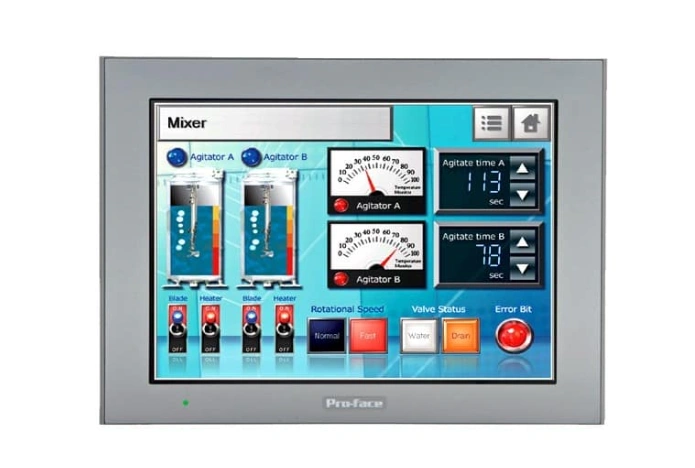
Panel sizes range from 3.5 to 21 inches. The GP4000 series also supports Remote HMI functionality, which allows thin client operation from a central server. For system integrators working across multiple automation brands, Pro-face is a frequently practical default.
The HMIGTO series from Schneider Electric is built around Modicon-based installations, with native Modbus TCP and EtherNet/IP connectivity. Development runs through Vijeo Designer, which supports third-party controller connections as well. Display options run from 3.5 to 15 inches, all with IP65 front-face ratings for standard panel-mount installation.
| Application Type | Recommended HMI | Display Range | Software | Primary Protocol |
| Small machine / single controller | Allen-Bradley PanelView Plus 7 Standard | 4–10 in. | FactoryTalk View ME | EtherNet/IP |
| Mid-size Siemens PLC installation | Siemens SIMATIC KTP / TP Comfort | 7–15 in. | TIA Portal WinCC | PROFINET |
| Large Mitsubishi process line | Mitsubishi GOT2000 | 10–21 in. | GT Designer3 | Ethernet (MELSEC) |
| Mixed-brand / multi-protocol plant | Pro-face GP4000 | 3.5–21 in. | GP-Pro EX | Multi-protocol |
| Omron NJ/NX automation system | Omron NA5 | 7–15 in. | Sysmac Studio | EtherNet/IP |
| Schneider Modicon installation | Schneider HMIGTO | 3.5–15 in. | Vijeo Designer | Modbus TCP / EtherNet/IP |
The industrial HMI is the panel that matches your environment’s IP requirements, speaks your controller’s protocol without a workaround, and runs on a software platform your team can maintain years from now.
Zancot stocks a full range of industrial HMI panels from Allen-Bradley PanelView, Siemens SIMATIC, and Mitsubishi GOT2000 series – including new, surplus, and reconditioned units ready to ship. Need to match a panel with the right controller? The Zancot PLC category covers compatible controllers across all major brands.
Browse industrial HMIs on Zancot and get the right panel specified correctly the first time.
What is the difference between an HMI and a SCADA system?
An industrial HMI operates at the machine or process level – it shows real-time data and allows direct operator interaction with a single machine or production unit. SCADA (Supervisory Control and Data Acquisition) operates at a higher level, aggregating data from multiple PLCs or HMIs across an entire facility or site. Most modern plants use both: HMIs at the machine, SCADA at the plant level.
Can an Allen-Bradley HMI communicate with a Siemens PLC?
Yes, but not natively. A Siemens PLC uses PROFINET; an Allen-Bradley PanelView terminal uses EtherNet/IP. Communication between them typically requires a protocol gateway or an OPC server acting as a bridge. Some Siemens SIMATIC HMI panels can communicate with Allen-Bradley controllers using the EtherNet/IP driver configured through TIA Portal, but it requires additional setup.
What does IP65 mean on an HMI panel?
IP65 means the panel is fully protected against dust ingress and can withstand low-pressure water jets from any direction. For standard panel-mount applications where the front face is sealed into a cabinet, IP65 is sufficient. Washdown environments require IP66 or NEMA 4X.
What is a thin client HMI?
A thin client HMI has no local application runtime. It connects to a central server and renders the operator interface remotely over the network. It’s cost-effective for high-count operator station deployments but introduces a dependency on network and server availability.
Is Windows CE still safe to run on an industrial HMI?
Windows CE reached end of life in 2018 and no longer receives security patches. For facilities with active cybersecurity requirements or long deployment horizons, CE-based panels represent a risk. Panels running Windows 10 IoT Enterprise LTSC are the current standard for panel PCs, with a 10-year support lifecycle.
How do you choose the right display size for an HMI?
Display size should follow the application’s information density requirements. A basic status display or alarm acknowledgment screen works well at 7–10 inches. Process overviews with multiple trend charts, recipe management, or operator dashboards typically benefit from 12–15 inches or larger. Screen size is one of the last decisions to make – protocol, environment, and software ecosystem come first.
Master your setup with IFM sensors and cables. Decode the IFM204, clarify Balluff cross-references, check wiring steps, and configure IO-Link masters.
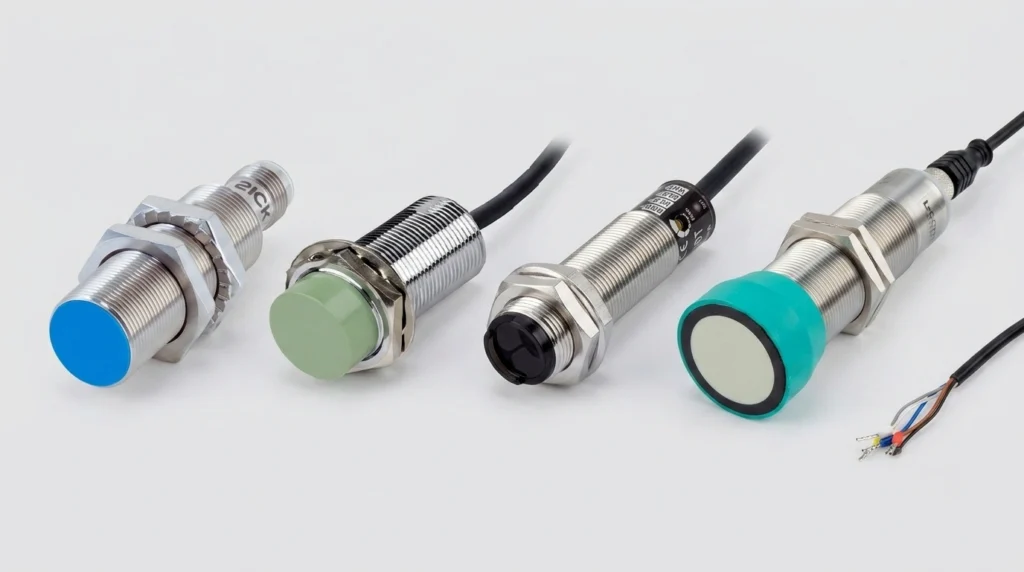
A practical industrial sensors guide covering proximity, photoelectric, ultrasonic, pressure and flow types, wiring, IP ratings, and top brands.
Navigate your Siemens VFD replacements. Decode SINAMICS S120 & G120 modules, configure software, and troubleshoot legacy MICROMASTER 440 fault codes.